Backend & Protocol
System Overview
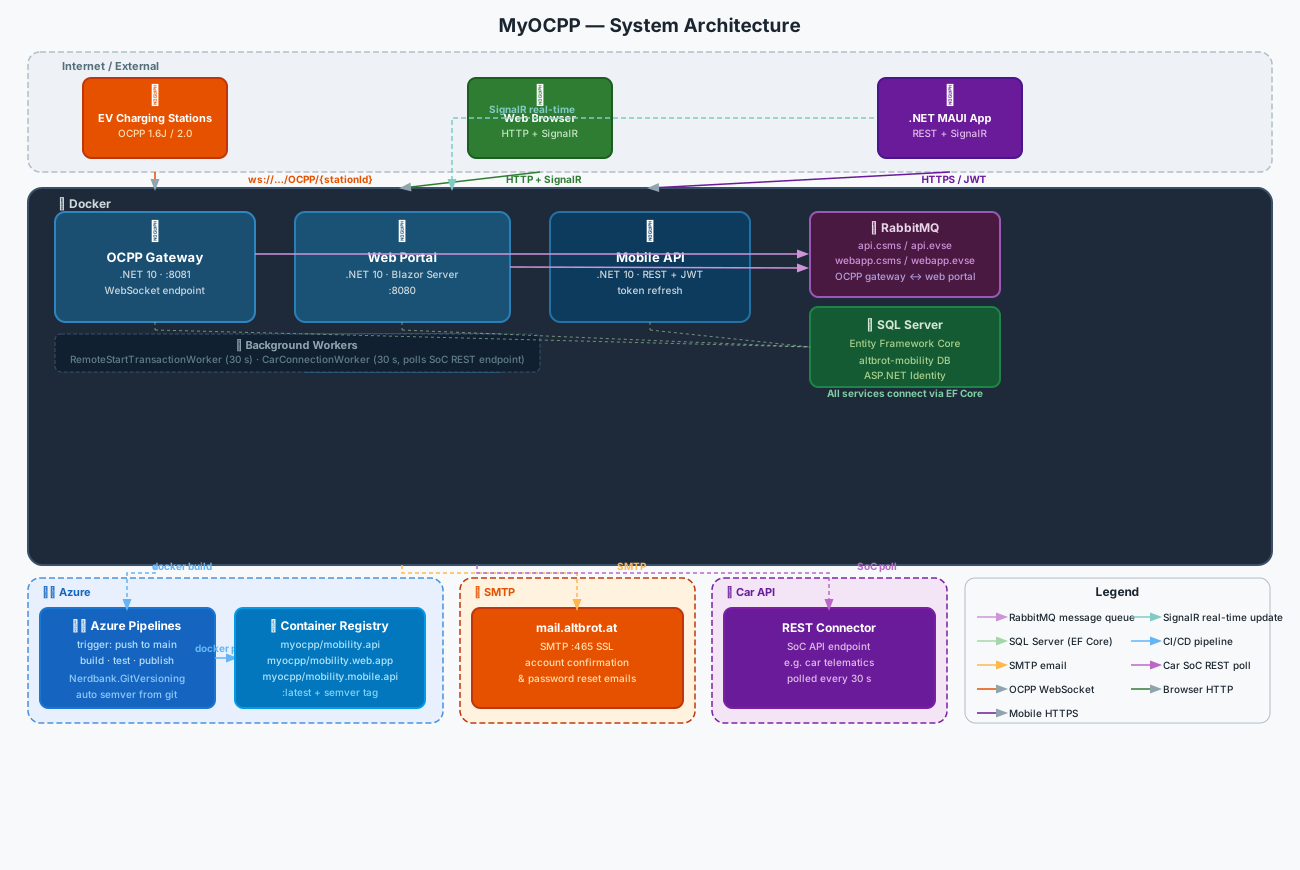
OCPP Protocol
Charging stations connect to the OCPP gateway over WebSocket:
ws://host:8081/OCPP/{stationId}The stationId segment corresponds to the unique serial number configured in the web portal when a station is registered. OCPP username/password credentials configured on the station are validated on connection.
Both OCPP 1.6J and OCPP 2.0 handlers live in the same backend and are selected per connection based on the subprotocol negotiated during the WebSocket handshake.
OCPP 1.6 — Supported Messages
Charger → Server (handled):
| Message | What the handler does |
|---|---|
BootNotification | Registers the station, sets protocol version, returns Accepted |
Authorize | Validates the RFID tag against the account’s tag list |
StatusNotification | Updates connector status in the database, broadcasts via SignalR |
MeterValues | Parses meter readings, updates PowerInKW, EnergyInKWH, StateOfCharge on the connector |
StartTransaction | Creates a Transaction record with start time and meter start value |
StopTransaction | Closes the transaction, records stop time, meter stop value, and stop reason |
Heartbeat | Acknowledges keep-alive, returns server time |
DataTransfer | Handles vendor-specific data payloads |
GetConfiguration (response) | Parses and returns the config key-value pairs to the requesting client |
ChangeConfiguration (response) | Returns the result of a config write attempt |
RemoteStartTransaction (response) | Propagates Accepted/Rejected back to the initiating web session |
RemoteStopTransaction (response) | Same for stop commands |
Reset (response) | Propagates soft/hard reset outcome |
UnlockConnector (response) | Returns unlock result |
Server → Charger (sent on demand):
RemoteStartTransaction, RemoteStopTransaction, ChangeAvailability, GetConfiguration, ChangeConfiguration, Reset (soft/hard), UnlockConnector
OCPP 2.0 — Supported Messages
OCPP 2.0 restructures several concepts — transactions are now managed via TransactionEvent with Started, Updated, and Ended triggers instead of separate start/stop messages, and availability changes use ChangeAvailabilityRequest at the EVSE level rather than the connector level. The 2.0 handlers cover the same operations plus the new NotifyEvent message for device-level status changes.
Charger → Server: BootNotification, Authorize, StatusNotification, TransactionEvent (all three triggers), Heartbeat, DataTransfer, NotifyEvent, UnlockConnector (response)
Server → Charger: RequestStartTransaction, RequestStopTransaction, ChangeAvailability, Reset (immediate/OnIdle)
Meter Value Processing
When a MeterValues message arrives the handler extracts standard measurands — Active Import Register (kWh), Power Active Import (kW), SoC percentage — and writes them directly to the Connector record. This is the source of truth for the live “energy consumed” and “current power” values shown in both the web portal and the mobile app.
Data Model
The platform is structured around Accounts as the top-level tenant. Every station, tag, user, schedule, and transaction belongs to one account.
Charging Station
Each station record stores its display name, its OCPP serial number (Id), OCPP credentials (Username / Password), an optional client certificate thumbprint for mutual TLS, enabled flag, protocol version, price per kWh, and connection timestamp. Stations belong to an account and have a list of connectors and a list of users who may access them.
Connector
A connector represents a physical socket on a charging station. It carries the current OCPP status (ConnectorStatus enum: Unknown, Available, Occupied, Reserved, Unavailable, Faulted), the last status timestamp, live meter readings (PowerInKW, EnergyInKWH, AvgPowerInKW), state of charge percentage, and an IsCharging flag. Each connector maintains a list of historical transactions and pending schedules.
Transaction
Transactions record every charging session. Fields: unique Uid, start RFID tag, start time, meter start (kWh), start reason, stop RFID tag, stop time, meter stop (kWh), stop reason. The energy consumed and cost for any session can be derived from the meter difference and the station’s price per kWh at the time.
RFID Tag
Tags carry a raw RFID ID (max 20 chars), a display name, expiry date, a blocked flag, an optional description, and an optional parent tag reference. The parent/child hierarchy supports group authorisation — blocking a parent automatically affects all children. Tags are scoped to an account and can be assigned to multiple users.
Charging Schedule
Schedules reference a connector, a user, an RFID tag, a name, enabled flag, schedule type (once / recurring), and a calculated StartTime in UTC. The background worker evaluates them every 30 seconds. When the StartTime is reached it issues a RemoteStartTransaction over OCPP using the schedule’s tag.
If a car with a REST connector is linked, the schedule system can also factor in the car’s current state of charge — the CalculateSoCQuery derives how many hours of charging are needed to reach the target and back-calculates the start moment.
User
Users extend ASP.NET Identity (IdentityUser<Guid>) with: a list of refresh tokens, assigned charging stations, assigned RFID tags, last login timestamp, a linked UserDetail record (full name, timezone, dark mode preference), and an optional linked Car.
Car
The car profile stores a display name, brand/model, battery size in kWh, and current state of charge as a percentage (SoC). Optionally a RESTConnector is attached — an HTTP endpoint the platform polls to retrieve live SoC data from the car’s own API or a telematics provider.
Permissions
Access to every page is governed by a claim-based policy. The application defines these permissions:
| Permission | Controls access to |
|---|---|
ReadOverview | Dashboard |
ReadChargingStations | Stations list and detail |
ManageChargingStations | Create, edit, delete stations |
ReadTags | Tags list |
ManageTags | Create, edit, delete tags |
ReadSchedules | Schedules list |
ReadUsers | Users list and detail |
ManageUsers | Create, edit, delete users |
ReadSettings | Settings pages |
ReadTransactions | Transactions list |
Each nav item in the sidebar is wrapped in <AuthorizeView Policy="..."> so users only see what they are permitted to access. The admin account gets all permissions; regular user accounts get a configurable subset assigned by an admin at creation time.
CI/CD Pipeline
Builds run on Azure Pipelines. The pipeline triggers on every push to main and runs two stages:
Stage 1 — build_sln Restores and compiles the solution, then publishes three artifacts: the OCPP API, the Blazor web app, and the mobile REST API. Test projects run as part of this stage.
Stage 2 — build_docker
Builds three Docker images from the published artifacts and pushes them to the Altbrot Azure Container Registry with two tags each: latest and the semver tag derived from Nerdbank.GitVersioning (e.g. 2.22.14). The version is computed from the git commit height above the last version tag — no manual bumps, no version files to maintain.
All three services (myocpp/altbrot.mobility.api, myocpp/altbrot.mobility.web.app, myocpp/altbrot.mobility.mobile.api) are independently deployable containers. The .NET MAUI mobile app is distributed as a platform-native binary outside of this pipeline.